


Microsoft AZ-800 Study Guide Archives Updated on Mar 25, 2026
Download AZ-800 Mock Test Study Material
NEW QUESTION # 133
What should you implement for the deployment of DC3?
- A. Azure Active Directory Domain Services (Azure AD DS}
- B. Azure AD Application Proxy
- C. an Azure AD administrative unit
- D. an Azure virtual machine
Answer: D
Explanation:
Create a domain controller named dc3.corp.fabrikam.com in Vnet1.
In a hybrid network, you can configure Azure virtual machines as domain controllers. The domain controllers in Azure communicate with the on-premises domain controllers in the same way that on-premises domain controllers communicate with each other.
NEW QUESTION # 134
Your network contains an Active Directory Domain Services (AD DS) forest. The forest contains three domains. Each domain contains 10 domain controllers.
You plan to store a DNS zone in a custom Active Directory partition.
You need to create the Active Directory partition for the zone. The partition must replicate to only four of the domain controllers.
What should you use?
- A. dnscmd.exe
- B. Active Directory Sites and Services
- C. Set-DnsServer
- D. New-ADObject
Answer: A
NEW QUESTION # 135
You have a server named Server1 that has the Hyper-V server role installed. Server1 hosts the virtual machines shown in the following exhibit.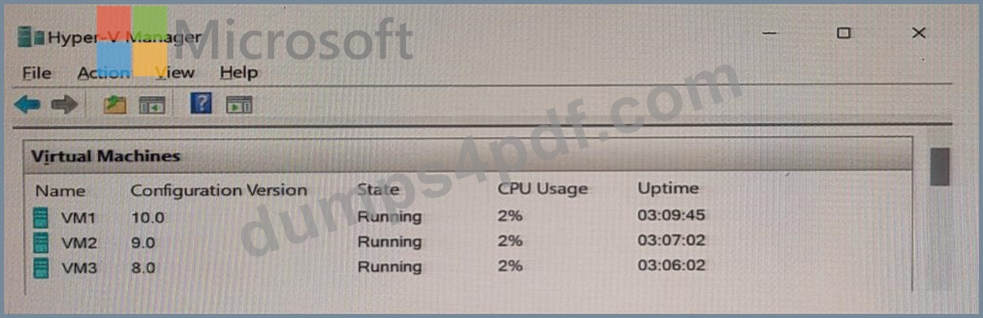
Use the drop-down menus to select the answer choice that completes each statement based on the information presented in the graphic.
NOTE: Each correct selection is worth one point.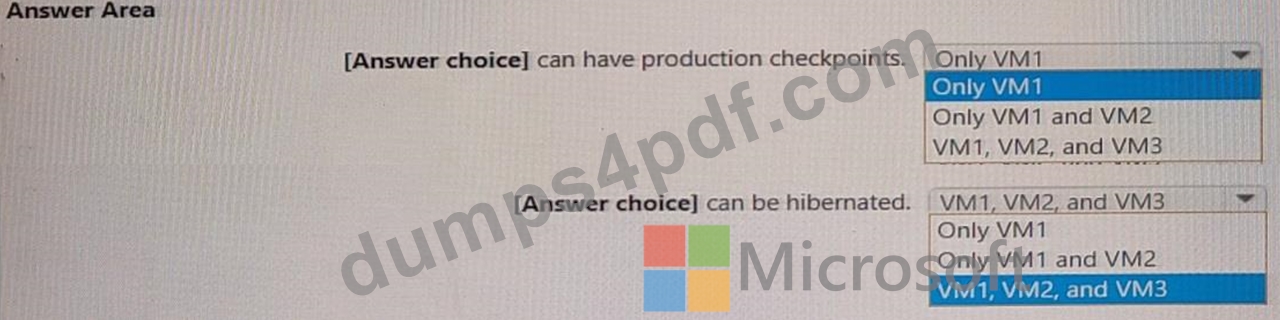
Answer:
Explanation: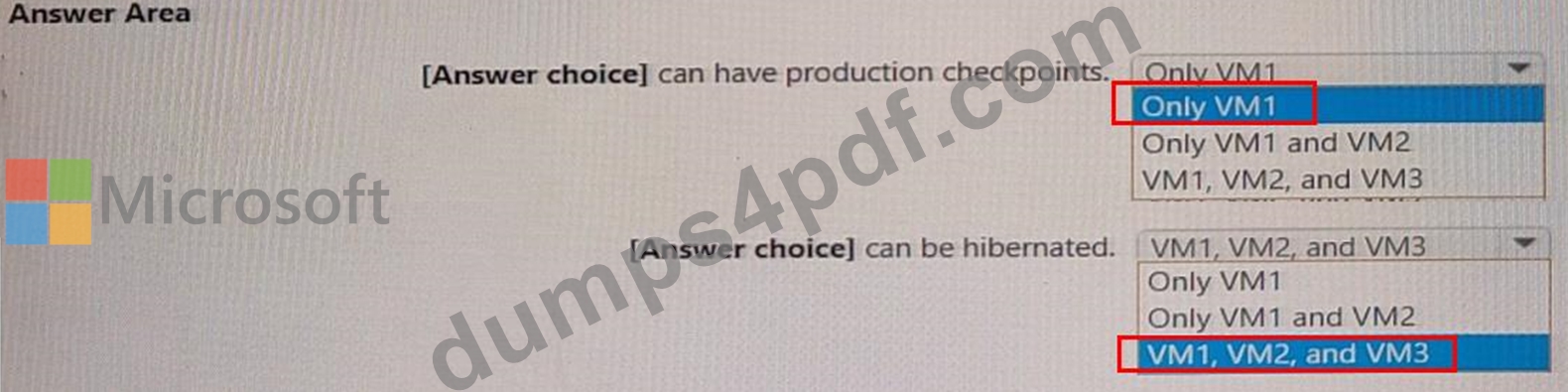
NEW QUESTION # 136
SIMULATION
Task 7
You need to collect the recommended Windows Performance Counters from SRV1 in a Log Analytics workspace.
The required tiles are stored in a shared folder named \dc\install.
Answer:
Explanation:
See the solution of this Task below
Explanation:
To collect the recommended Windows Performance Counters from SRV1 in a Log Analytics workspace, you can follow these steps:
Step 1: Access the Log Analytics Workspace Log in to the Azure portal and navigate to your Log Analytics workspace.
Step 2: Configure Performance Counters In the Log Analytics workspace, select Advanced settings and then choose Data > Windows Performance Counters1. You can add the recommended performance counters by selecting the + button. If you're using legacy agent management, you can add counters from the Legacy agents management menu2.
Step 3: Add Performance Counters Select the counters you want to collect. You can add common counters quickly by checking the boxes next to them. For specific counters, enter the name of the counter in the format object(instance)\counter. For example, to collect the Processor Time counter for all instances of the Processor object, specify Processor(_Total)\% Processor Time.
Step 4: Set Sample Interval When adding a counter, you can set the sample interval, which is the frequency at which data is collected. The default is 10 seconds, but you can change this to a higher value if needed.
Step 5: Apply Configuration After adding the desired performance counters, select Apply at the top of the screen to save the configuration.
Step 6: Install and Configure the Agent Ensure that the Microsoft Monitoring Agent (MMA) is installed on SRV1. Configure the agent to report to your Log Analytics workspace by specifying the workspace ID and key during setup.
Step 7: Verify Data Collection After the agent is configured, it will start collecting the specified performance counters. You can verify the data collection in the Log Analytics workspace by running queries against the collected data.
Note: The legacy Log Analytics agent will be deprecated by August 2024. Migrate to the Azure Monitor agent before this date to continue ingesting data3.
By following these steps, you should be able to collect the recommended Windows Performance Counters from SRV1 in your Log Analytics workspace. Ensure that you have the necessary permissions and that SRV1 has network connectivity to Azure services.
NEW QUESTION # 137
Your network contains an Active Directory domain named contoso.com. The domain contains group managed service accounts (gMSAs). You have a server named Server1 that runs Windows Server and is in a workgroup. Server! hosts Windows containers.
You need to ensure that the Windows containers can authenticate to contoso.com.
Which three actions should you perform in sequence? To answer, move the appropriate actions from the list of actions to the answer area and arrange them in the correct order.
Answer:
Explanation: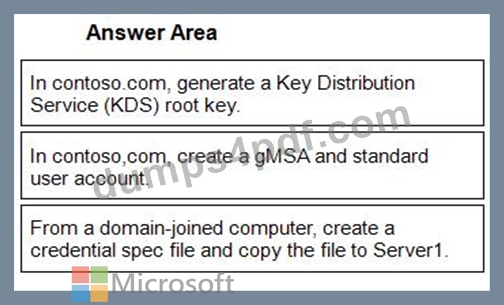
1 - In contoso.com, generate a Key Distribution Service (KDS) root key.
2 - In contoso,com, create a gMSA and standard user account.
3 - From a domain-joined computer, create a credential spec file and copy the file to Server1.
NEW QUESTION # 138
You have an on-premises server that runs Windows Server and contains a file share named Share1.
You have an Azure subscription that contains an Azure Files share named azshare1 and an Azure File Sync instance named Synd. Sync1 syncs Share1 with azshare1.
You need to delete Synd.
Which four resources should you delete in sequence? To answer, move the appropriate resources from the list of resources to the answer area and arrange them in the correct order.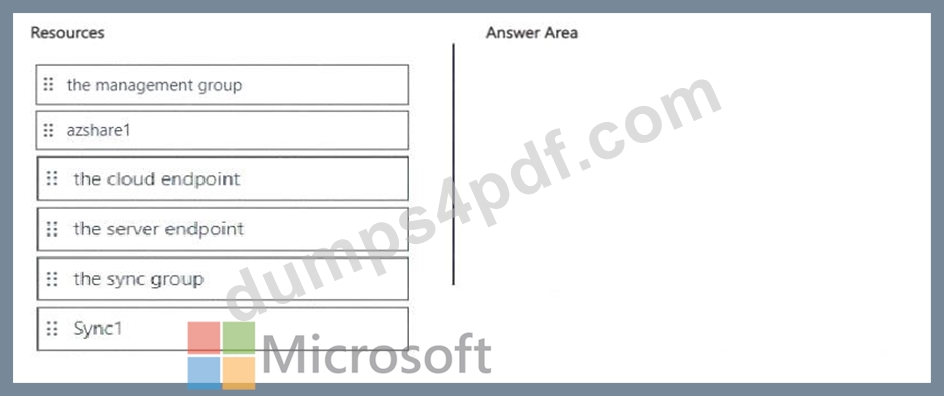
Answer:
Explanation: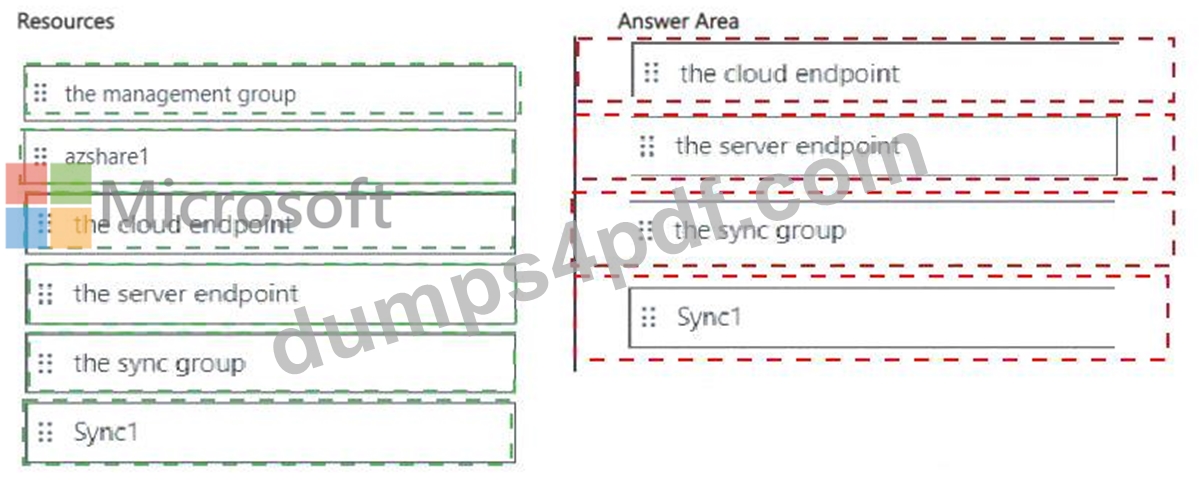
Explanation: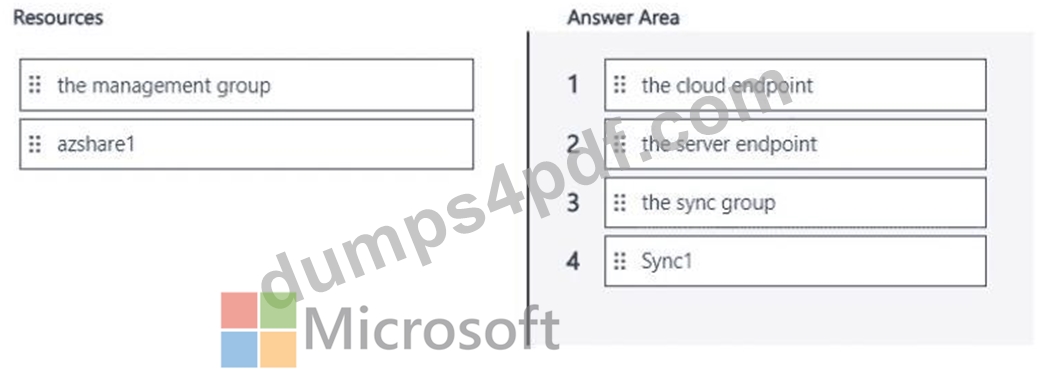
NEW QUESTION # 139
You have an on-premises server named Server1 that runs Windows Server. You have an Azure virtual network that contains an Azure virtual network gateway. You need to connect only Server1 to the Azure virtual network. What should you use?
- A. Azure Extended Network
- B. Azure Network Adapter
- C. an ExpressRoute circuit
- D. a Site-to-SiteVPN
Answer: A
Explanation:
Reference:
https://docs.microsoft.com/en-us/windows-server/manage/windows-admin-center/azure/use-azure-network-adapter
NEW QUESTION # 140
Task 2
You need to ensure that you can manage SRV1 remotely by using PowerShell See the solution of this Task below.
Answer:
Explanation:
To manage SRV1 remotely using PowerShell, you'll need to set up PowerShell Remoting. Here's a step-by-step guide:
Step 1: Enable PowerShell Remoting on SRV1 On SRV1, run the following command to enable PowerShell Remoting:
Enable-PSRemoting -Force
This command configures the computer to receive PowerShell remote commands that are sent by using the WS-Management technology.
Step 2: Configure the TrustedHosts List (If Needed) If you're managing SRV1 from a computer that is not part of the same domain, you'll need to add the managing computer's name to the TrustedHosts list on SRV1:
Set-Item wsman:\localhost\Client\TrustedHosts -Value "ManagingComputerName" -Concatenate -Force Replace "ManagingComputerName" with the name of your managing computer.
Step 3: Start a Remote Session From your managing computer, start a remote session with SRV1 using the Enter-PSSession cmdlet:
Enter-PSSession -ComputerName SRV1 -Credential (Get-Credential)
This command prompts you for credentials and then starts a remote session with SRV1.
Step 4: Run Remote Commands Once the remote session is established, you can run any PowerShell command as if you were directly on SRV1. For example:
Get-Service
This command gets the status of services on SRV1.
Step 5: Exit the Remote Session When you're finished, exit the remote session:
Exit-PSSession
Note: Ensure that both the managing computer and SRV1 are properly configured to communicate over the network, and that any firewalls allow for the necessary ports (default is 5985 for HTTP and 5986 for HTTPS) to be open for WS-Management traffic12.
By following these steps, you should be able to manage SRV1 remotely using PowerShell. Make sure you have the appropriate administrative privileges to perform these actions.
NEW QUESTION # 141
Hotspot Question
Your network contains an Active Directory Domain Services (AD DS) forest named contoso.com that has the domains shown in the following table.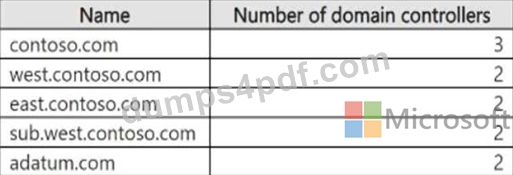
You are creating a disaster recovery plan for the forest.
What is the minimum number of domain naming FSMO role holders and RID master FSMO role holders that should be online to maintain full functionality of the forest? To answer, select the appropriate options in the answer area.
NOTE: Each correct selection is worth one point.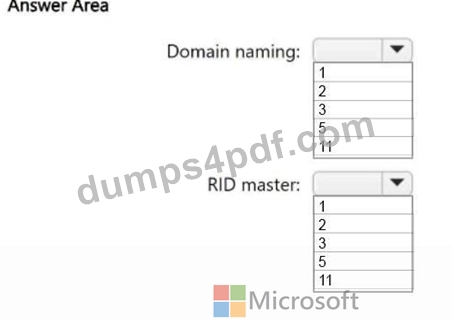
Answer:
Explanation: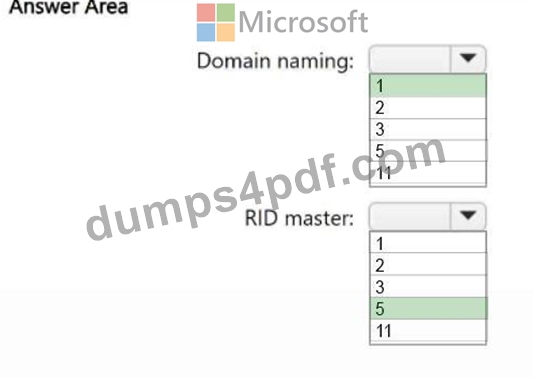
Explanation:
Box 1: 1
In a multi-domain Active Directory forest, you should have at least one Domain Naming Master and one RID Master online for full functionality. The Domain Naming Master role is forest-wide, while the RID Master role is per-domain. Having at least one of each ensures that domain creation and object creation/movement can continue without interruption.
Box 2: 5
Five RID masters, one for each domain.
Reference:
https://theitbros.com/fsmo-roles/
NEW QUESTION # 142
Your network contains an Active Directory forest. The forest contains two domains named contoso.com and east.contoso.com and the servers shown in the following table.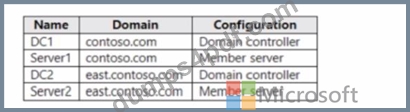
Contoso.com contains a user named User1.
You add User1 to the built-in Backup Operators group in contoso.com.
Which servers can User1 back up?
- A. DC1 only
- B. DC1. DCZ Serve1, and Server2
- C. DC! and DC2 only
- D. DC1 and Server! only
- E. Server1 only
Answer: A
NEW QUESTION # 143
You create a new Azure subscription.
You plan to deploy Azure Active Directory Domain Services (Azure AD DS) and Azure virtual machines.
You need to ensure that the virtual machines can join Azure AD DS.
Which three actions should perform in sequence? To answer, move the appropriate actions from the list of action of the answer area and arrange them in the correct order.
Answer:
Explanation:
Explanation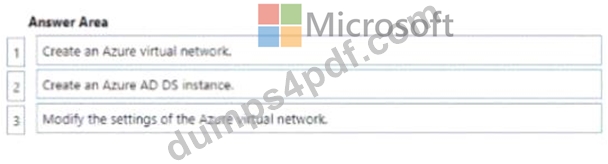
NEW QUESTION # 144
Your network contains an Active Directory Domain Services (AD DS) forest. The forest contains three domains. Each domain contains 10 domain controllers.
You plan to store a DNS zone in a custom Active Directory partition.
You need to create the Active Directory partition for the zone. The partition must replicate to only four of the domain controllers.
What should you use?
- A. dnscnd.exe
- B. New-ADObjett
- C. DNS Manager
- D. Windows Admin Center
Answer: A
NEW QUESTION # 145
You have an Azure virtual machine named VM1 that contains the drives shown in the following table.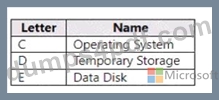
On VM1, you plan to install an app named App1. The data for App1 must be stored on a persistent data disk assigned to drive D.
You need assign the data disk to drive D.
What should you do on VM1 first?
- A. Change the drive letter of the Temporary Storage drive to F.
- B. Move pagefile.sys to the Operating System drive.
- C. Expand the Temporary Storage drive.
- D. Stop (deallocate) VM1.
Answer: D
NEW QUESTION # 146
You create a new Azure subscription.
You plan to deploy Azure Active Directory Domain Services (Azure AD DS) and Azure virtual machines. The virtual machines will be joined to Azure AD DS.
You need to deploy Active Directory Domain Services (AD DS) to ensure that the virtual machines can be deployed and joined to Azure AD DS.
Which three actions should you perform in sequence? To answer, move the appropriate actions from the list of actions to the answer area and arrange them in the correct order.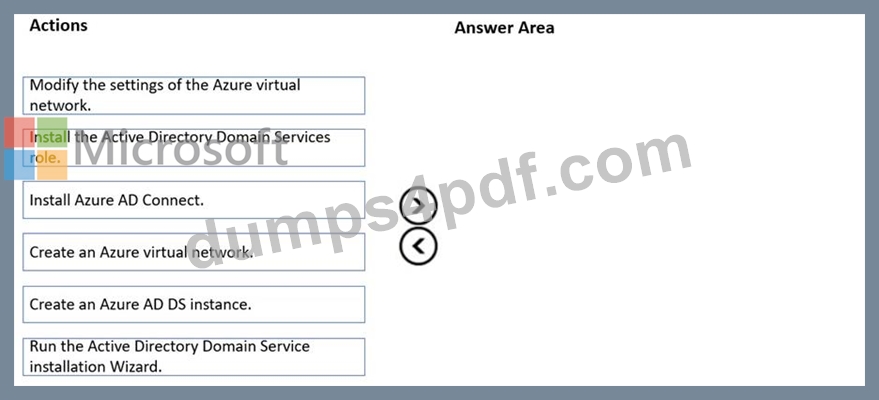
Answer:
Explanation: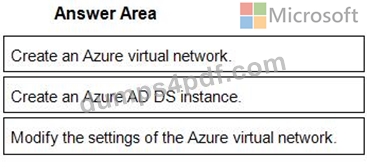
1 - Create an Azure virtual network.
2 - Create an Azure AD DS instance.
3 - Modify the settings of the Azure virtual network.
Reference:
https://docs.microsoft.com/en-us/azure/active-directory-domain-services/tutorial-create-instance
Topic 1, Fabrikam inc.
To start the case study
To display the first question in this case study, click the Next button. Use the buttons in the left pane to explore the content of the case study before you answer the questions. Clicking these buttons displays information such as business requirements, existing environment, and problem statements, if the case study has an All Information tab. note that the information displayed is identical to the information displayed on the subsequent tabs. When you are ready to answer a question, click the Question button to return to the question.
Overview
Fabrikam, Inc. Is a manufacturing company that has a main office In New York and a branch office in Seattle.
On-premises Servers
The on-premises network contains servers that run Windows Server as shown in the following table.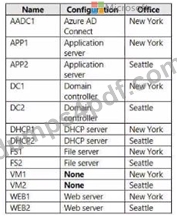
DC1 hosts all the operation master roles.
WEB1 and WEB2 run an Internet Information Services (IIS) web app named Webapp1.
On-premises Network
The New York and Seattle offices are connected by using redundant WAN links.
The client computers in each office get IP addresses from their local DHCP server.
DHCP! contains a scope named Scope1 that has addresses for the New York office. DHCP2 contains a scope named Scope2 that has addresses for the Seattle office.
Group Policy Object (GPOs)
The cwp.fabrikam.com domain contains the organizational units (OUs) and custom Group Policy Objects (GPOs) shown in the following table.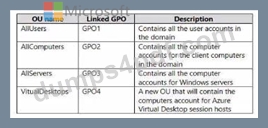
Requirements:
Fabrikam Identifies the following planned changes:
* Create a single Azure subscription named Sub1 that will contain a single Azure virtual network named Vnet1.
* Replace the WAN links between the Seattle and New York offices by using Azure Virtual WAN and ExpressRoute. Both on-premises offices will be connected to Vnet1 by using ExpressRoute.
* Create three Azure file shares named newyorkfiles, seattfefiles, and companyfiles.
* Create a domain controller named dc3.corp.fabrikam,com in Vnet1.
* Deploy an Azure Virtual Desktop host pool lo Vnet1. The Azure Virtual Desktop session hosts will be hybrid Azure AD joined.
* License all servers for Microsoft Defender for servers.
* Use Azure Policy to enforce configuration management policies on the servers in Azure and on-premises.
Networking Requirements
Fabrikam identifies the following security requirements:
* Apply GP04 to the Azure Virtual Desktop session hosts. Ensure that Azure Virtual Desktop user sessions lock after being idle for 10 minutes. Users must be able to control the lockout lime manually from their client computer.
* Ensure that server administrators request approval before they can establish a Remote Desktop connection to an Azure virtual machine. If the request is approved, the connection must be established within two hours.
* Prevent user passwords from containing all or part of words that are based on the company name, such as Fab. fabrikam or fsbr! |.
* Ensure that all instances of Webapp1 use the same service account. The password of the service account must change automatically every 30 days.
* Prevent domain controllers from directly contacting hosts on the internet.
File Sharing Requirements
You need to configure the synchronization of Azure files to meet the following requirements:
* Ensure that seattlefiles syncs to FS2.
* Ensure that newyorkfiles syncs to FS1.
* Ensure that companyfiles syncs to both FS1 and FS2.
NEW QUESTION # 147
Your network contains an Active Directory Domain Services (AD DS) forest named contoso.com. The forest contains a child domain named east.contoso.com and the servers shown in the following table.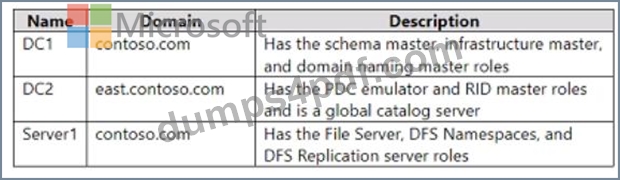
You need to create a folder for the Central Store to manage Group Policy template files for the entire forest.
What should you name the folder, and on which server should you create the folder? To answer, select the appropriate options in the answer area.
NOTE: Each correct selection is worth one point.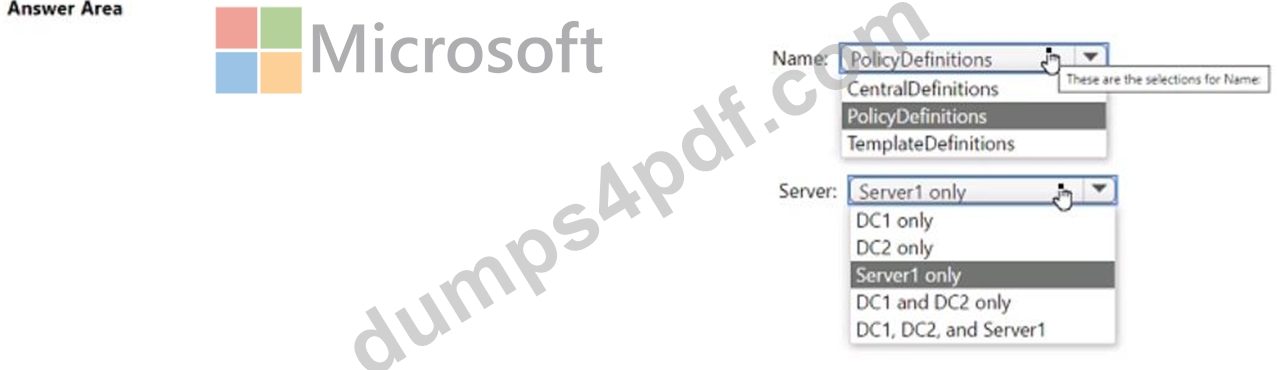
Answer:
Explanation: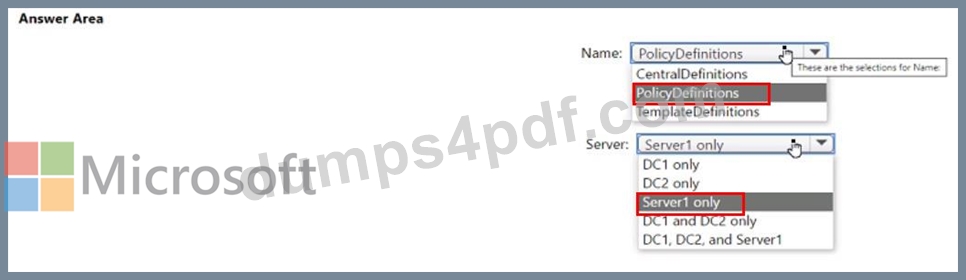
NEW QUESTION # 148
You have on-premises file servers that run Windows Server as shown in the following table.
You have the Azure file shares shown in the following table.
You add a Storage Sync Service named Sync1 and an Azure File Sync sync group named Group1. Group1 uses share1 as a cloud endpoint.
You register Server1 and Server2 with Sync1. You add D:\Folder1 from Server1 as a server endpoint in Group1.
For each of the following statements, select Yes if the statement is true. Otherwise, select No.
NOTE: Each correct selection is worth one point.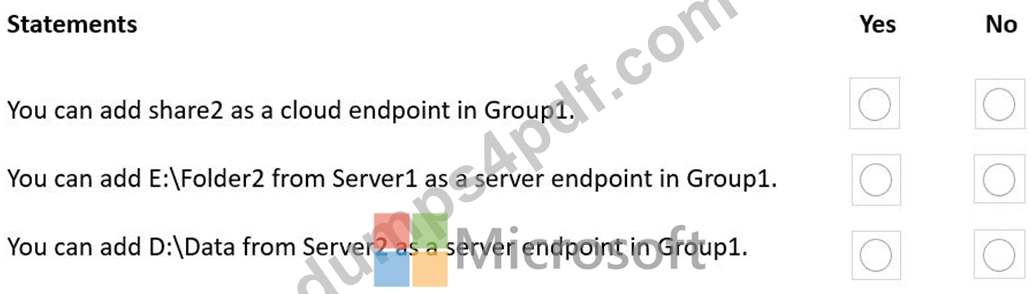
Answer:
Explanation: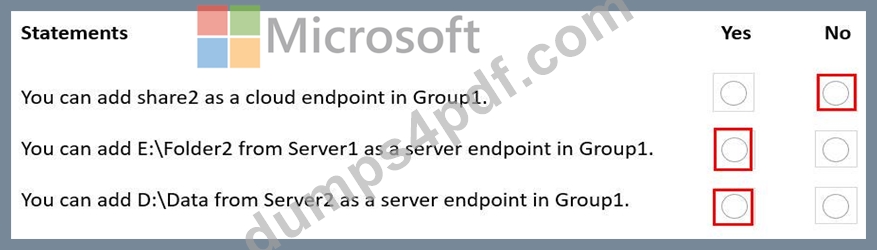
Reference:
https://docs.microsoft.com/en-us/azure/storage/file-sync/file-sync-planning
NEW QUESTION # 149
You have a server that runs Windows Server 2022 and has the network adapters shown in the following table.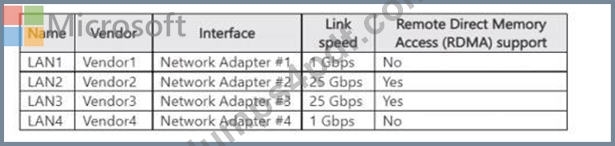
You need to configure NIC learning for LAN2 and LAN3. The solution must support Dynamic Virtual Machine Multi-Queue (d.VMMQ).
What should you use?
- A. Static teaming mode
- B. Switch Embedded Teaming (SET)
- C. LACP teaming mode
- D. load balancing and failover (LBFO)
Answer: B
Explanation:
The networking section of the AZ-800 material specifies that Switch Embedded Teaming (SET) is the teaming technology for Hyper-V hosts introduced in Windows Server 2016 and enhanced in later versions.
The guide highlights that SET "integrates teaming into the Hyper-V virtual switch," and supports advanced offloads including RDMA, VMMQ/d.VMMQ, SR-IOV, and RSS when the NICs support them. Conversely, the legacy LBFO (Load Balancing/Failover) teaming is described as "not supported with RDMA or VMMQ on Hyper-V hosts" and is deprecated for Hyper-V scenarios. Static or LACP teaming modes refer to LBFO team modes and thus inherit those limitations. Because LAN2 and LAN3 are 25-Gbps adapters that support RDMA and the requirement explicitly calls for NIC learning with Dynamic VMMQ, the prescribed and supported solution is to create a SET team using those two adapters and bind it to the Hyper-V switch. The documentation emphasizes that SET "enables RDMA with SMB Direct and Dynamic VMMQ on teamed NICs," meeting the performance and capability requirements.
NEW QUESTION # 150
You need to meet the technical requirements for Server4.
Which cmdlets should you run on Server1 and Server4? To answer, select the appropriate options in the answer area.
NOTE: Each correct selection is worth one point.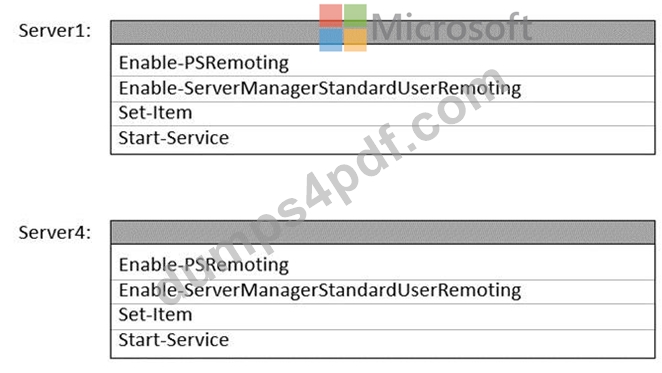
Answer:
Explanation: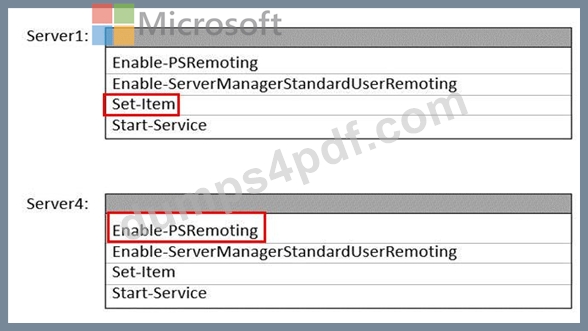
Reference:
https://4sysops.com/wiki/enable-powershell-remoting/
NEW QUESTION # 151
You have an Azure subscription that contains the storage accounts shown in the following table.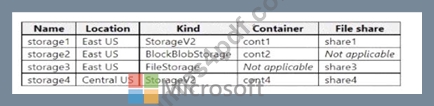
In the East US Azure region, you create a storage sync service named Synd.
You need to create a sync group in Synd.
Which storage accounts can you use, and what can you specify as the cloud endpoints? To answer, select the appropriate options in the answer area.
NOTE: Each correct selection is worth one point.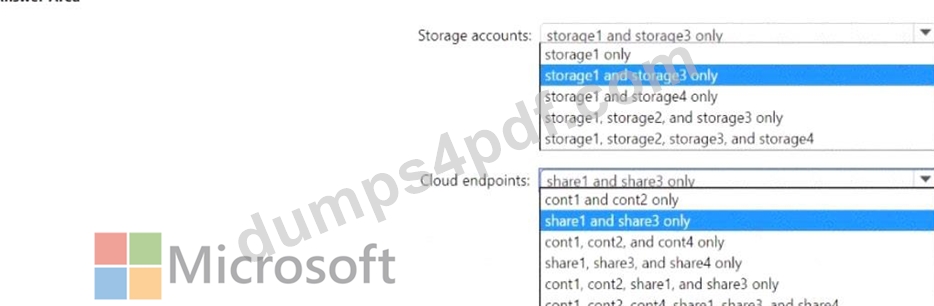
Answer:
Explanation: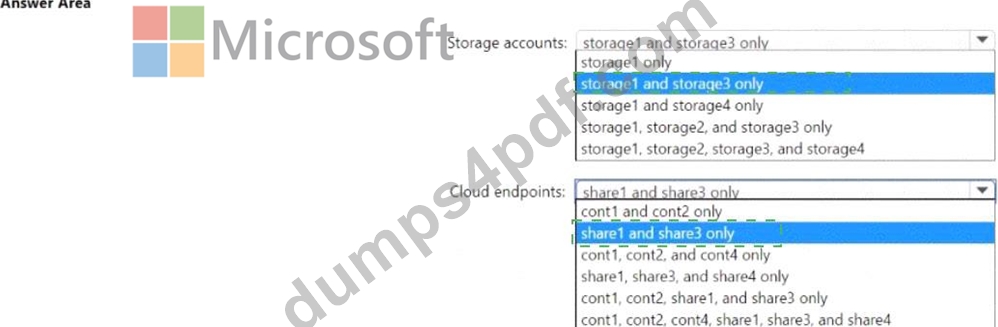
Explanation:
NEW QUESTION # 152
SIMULATION
Task 11
You need to ensure that all DHCP clients that get an IP address from SRV1 will be configured to use DC1 as a DNS server.
Answer:
Explanation:
See the solution of this Task below
Explanation:
One possible solution to ensure that all DHCP clients that get an IP address from SRV1 will be configured to use DC1 as a DNS server is to use the DHCP scope options. DHCP scope options are settings that apply to all DHCP clients that obtain an IP address from a specific scope. You can use the DHCP scope options to specify the DNS server IP address, as well as other parameters such as the default gateway, the domain name, and the DNS suffix. Here are the steps to configure the DHCP scope options on SRV1:
On SRV1, open DNS Manager from the Administrative Tools menu or by typing dnsmgmt.msc in the Run box.
In the left pane, expand your DHCP server and click on IPv4.
In the right pane, right-click on the scope that you want to configure and select Properties.
In the Scope Properties dialog box, click on the DNS tab.
Check the box Enable DNS dynamic updates according to the settings below. This option allows the DHCP server to register and update the DNS records for the DHCP clients.
Select the option Always dynamically update DNS records. This option ensures that the DHCP server updates both the A and PTR records for the DHCP clients, regardless of whether they request or support dynamic updates.
Check the box Discard A and PTR records when lease is deleted. This option allows the DHCP server to delete the DNS records for the DHCP clients when their leases expire or are released.
Check the box Dynamically update DNS records for DHCP clients that do not request updates. This option allows the DHCP server to update the DNS records for the DHCP clients that do not support dynamic updates, such as legacy or non-Windows clients.
In the DNS servers section, click on the Add button to add a new DNS server IP address.
In the Add Server dialog box, enter the IP address of DC1, which is the DNS server that you want to use for the DHCP clients, and click Add.
Click OK to close the Add Server dialog box and return to the Scope Properties dialog box.
Click OK to apply the changes and close the Scope Properties dialog box.
NEW QUESTION # 153
Which groups can you add lo Group3 and Groups? To answer, select the appropriate options in the answer area. NOTE Each correct selection is worth one point.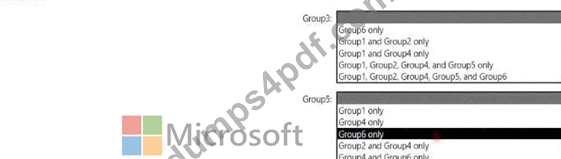
Answer:
Explanation: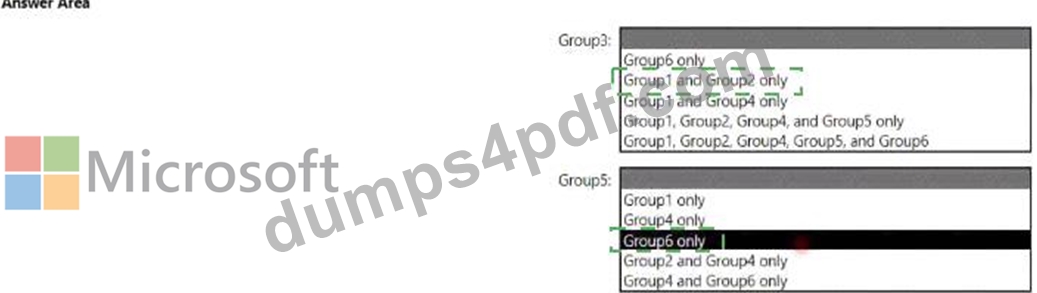
Explanation
NEW QUESTION # 154
Your network contains an Active Directory Domain Services (AD DS) domain named adatum.com. The domain contains a server named Server1 and the users shown in the following table.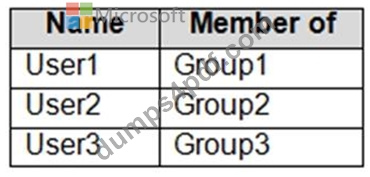
Server1 contains a folder named D:\Folder1. The advanced security settings for Folder1 are configured as shown in the Permissions exhibit. (Click the Permissions tab.)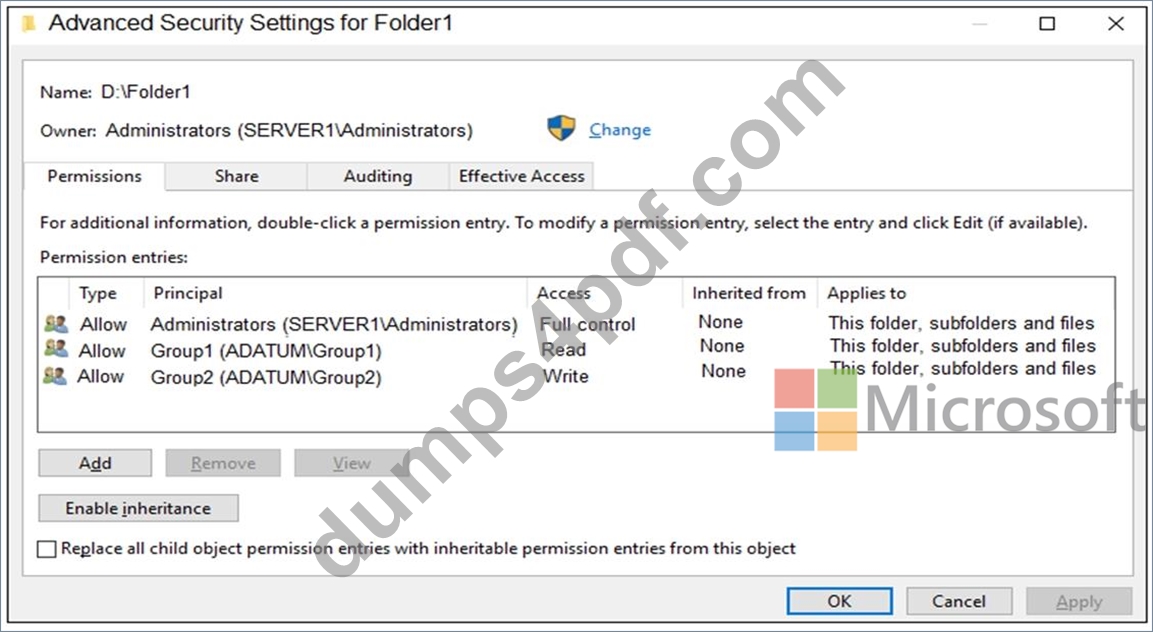
Folder1 is shared by using the following configurations:
The share permissions for Share1 are shown in the following table.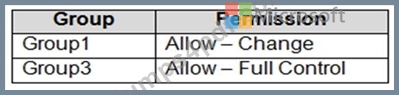
For each of the following statements, select Yes if the statement is true. Otherwise, select No.
NOTE: Each correct selection is worth one point.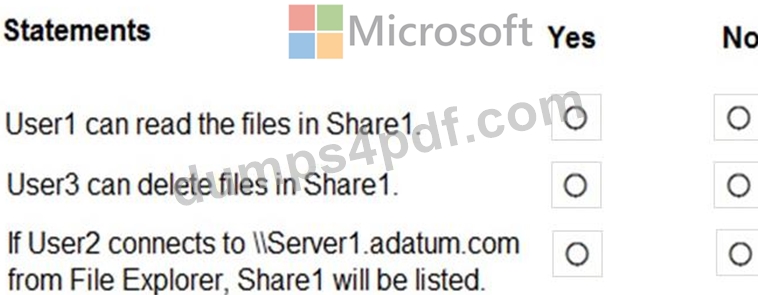
Answer:
Explanation: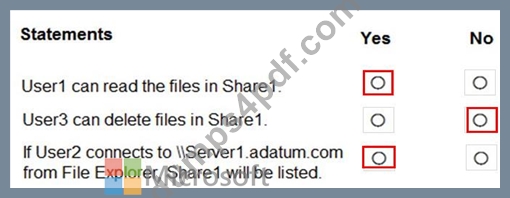
NEW QUESTION # 155
You need to sync files from an on premises server named Server1 to Azure by using Azure File Sync.
You have a cloud tiering policy that is configured for 30 percent free space and 70 days.
Volume E on Server1 is 500 GB.
A year ago, you configured E:\Data on Server1 to sync by using Azure File Sync. The files that are visible in E:\Data are shown in the following table.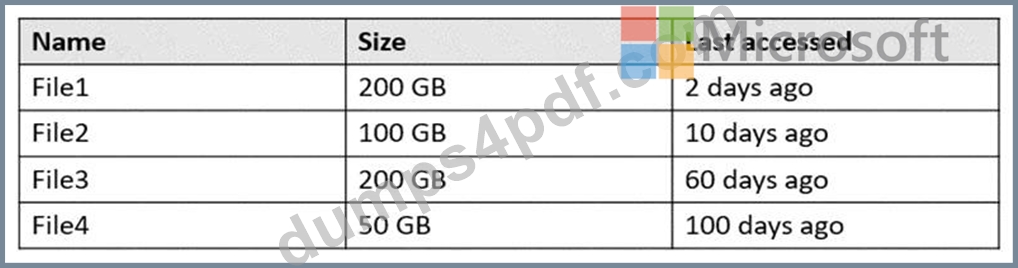
Volume E does NOT contain any other files.
Where are File1 and File3 located? To answer, select the appropriate options in the answer area.
NOTE: Each correct selection is worth one point.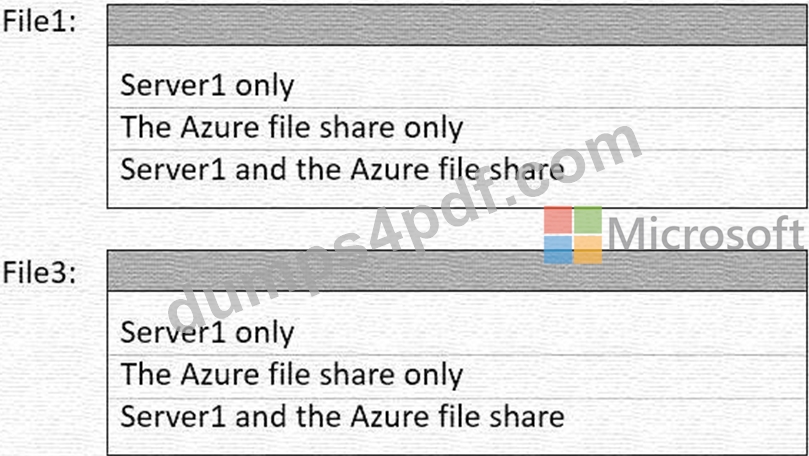
Answer:
Explanation: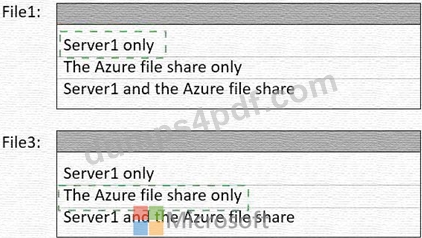
Explanation: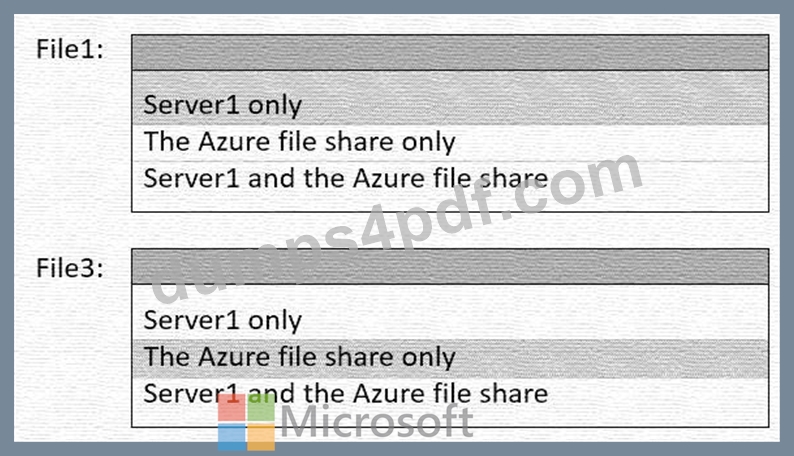
Reference:
https://docs.microsoft.com/en-us/windows-server/manage/windows-admin-center/azure/azure-file-sync
https://docs.microsoft.com/en-us/azure/storage/file-sync/file-sync-cloud-tiering-overview
NEW QUESTION # 156
You have a server named Server1.
You plan to use Storage Spaces to expand the storage available to Server1. You attach eight physical disks to Server1. Four disks are HDDs and four are SSDs.
You need to create a volume on Server1 that will use the storage on all the new disks. The solution must provide the fastest read performance for frequently used files.
Which three actions should you perform in sequence? To answer, move the appropriate actions from the list of actions to the answer area and arrange them in the correct order.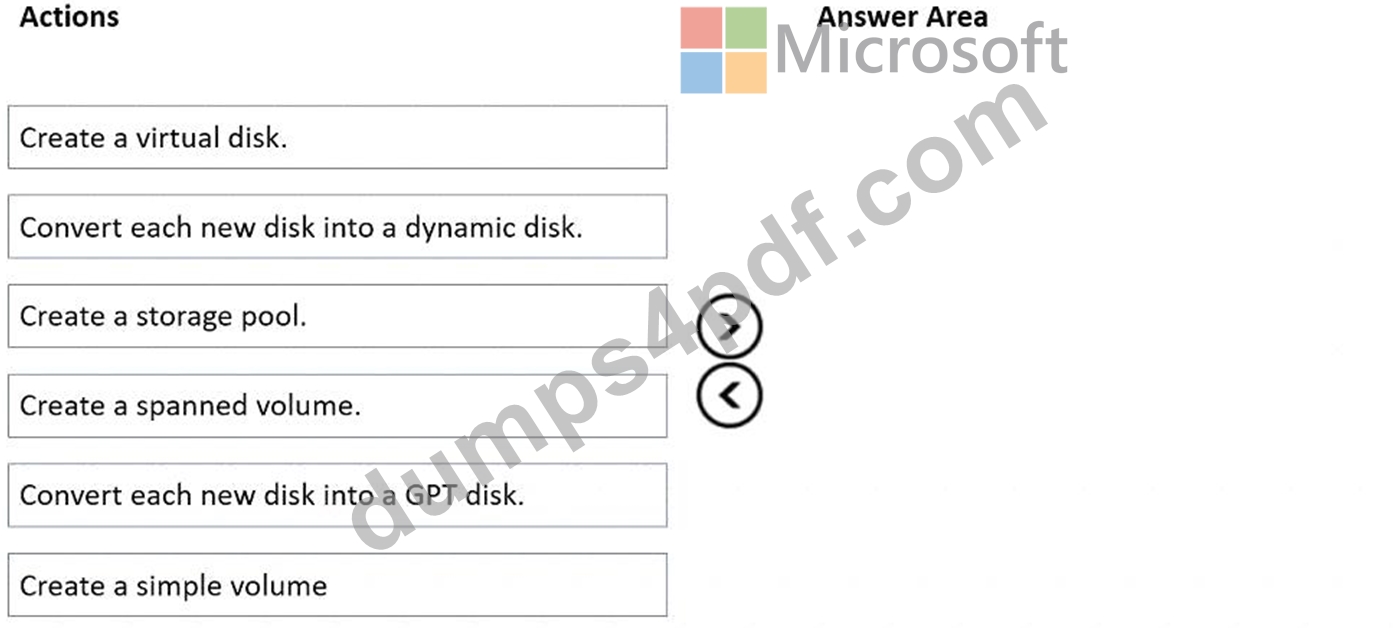
Answer:
Explanation: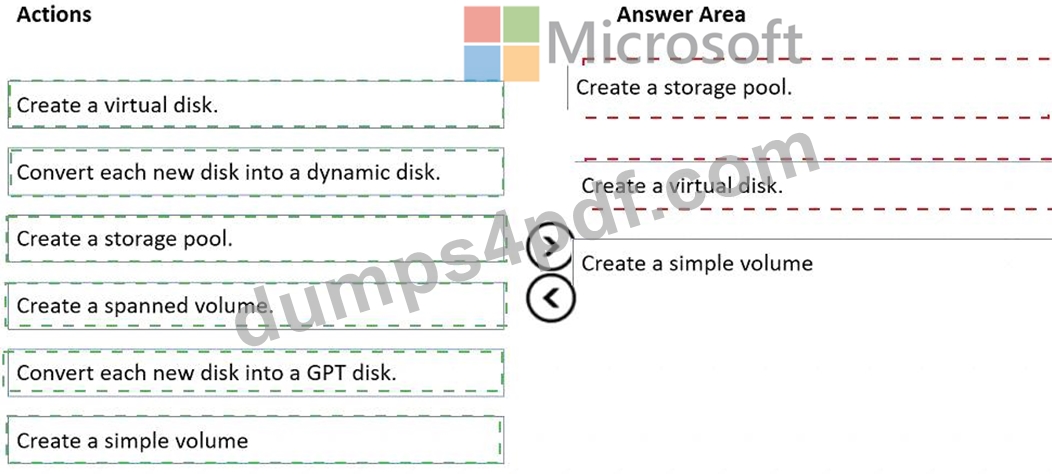
Explanation:
Graphical user interface, text, application Description automatically generated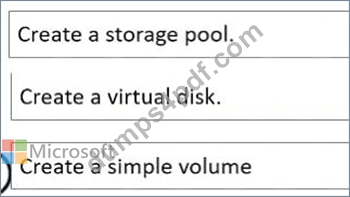
Reference:
https://redmondmag.com/articles/2018/07/31/storage-spaces-windows-server-2016-1.aspx
https://redmondmag.com/articles/2018/08/02/storage-spaces-windows-server-2016-2.aspx
NEW QUESTION # 157
......
AZ-800 Questions Prepare with Learning Information: https://www.dumps4pdf.com/AZ-800-valid-braindumps.html
Practice Material for AZ-800 Exam Question Preparation: https://drive.google.com/open?id=16_kVNTVTH9HBvTpXF5c1l6QCeJ6gbGPq